Voxa
A native macOS app that transcribes and diarizes meetings entirely on-device. Free on the Mac App Store, open source, and used every day for two hundred meetings.
v1.6.1 · 3.6 MB · macOS 14+ · Apple Silicon
200+ meetings recorded and summarised in daily use100% on-device, nothing is uploadedGPU-optimised for Apple Silicon via mlx-whisperSigned .dmg, released on GitHubRecognises a speaker by voice from one earlier confirmationDrivable from Claude Code through a local MCP server
The problem
Every transcription service asks for the same thing: upload the recording. For a meeting that contains client names, salaries or medical details, that is not a trade-off. It is a disqualification.
Apple Silicon has the hardware to do this locally. What was missing was an application that treats local inference as the normal path rather than a degraded fallback.
What it does
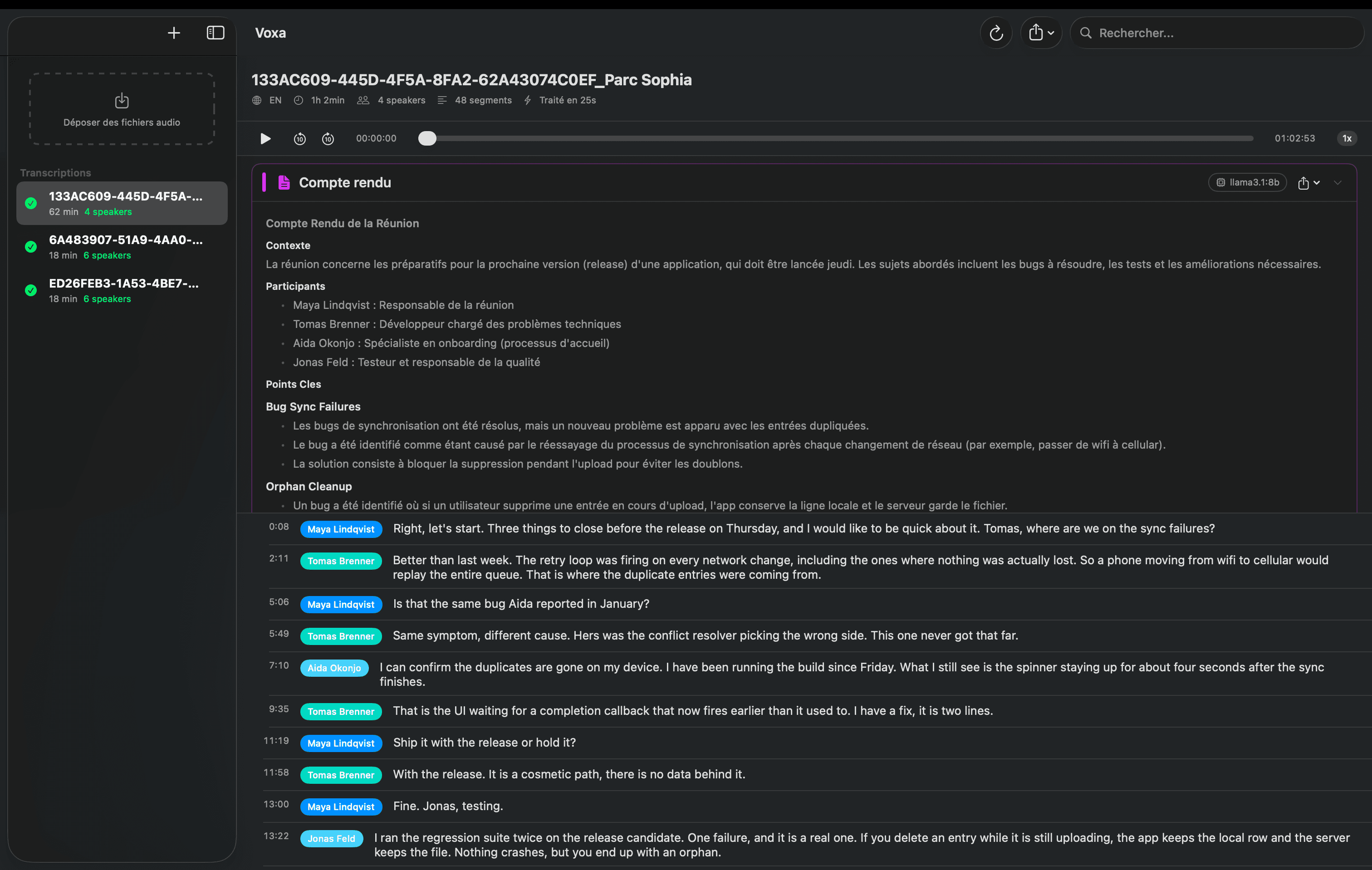
Records system audio and microphone together, transcribes with speaker diarization, and produces a summary, all on the machine, with no network call at any stage.
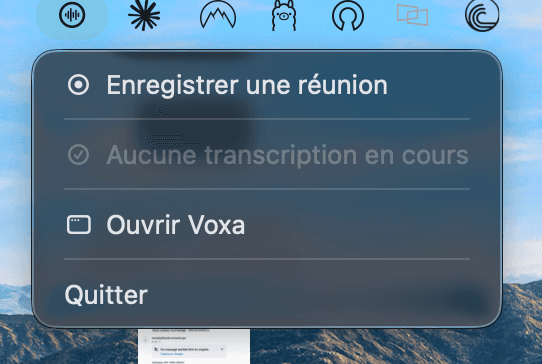
Exports to TXT, JSON, SRT and Markdown. Follows the system language between English and French. Progress lives in the menu bar so it can run while you work.
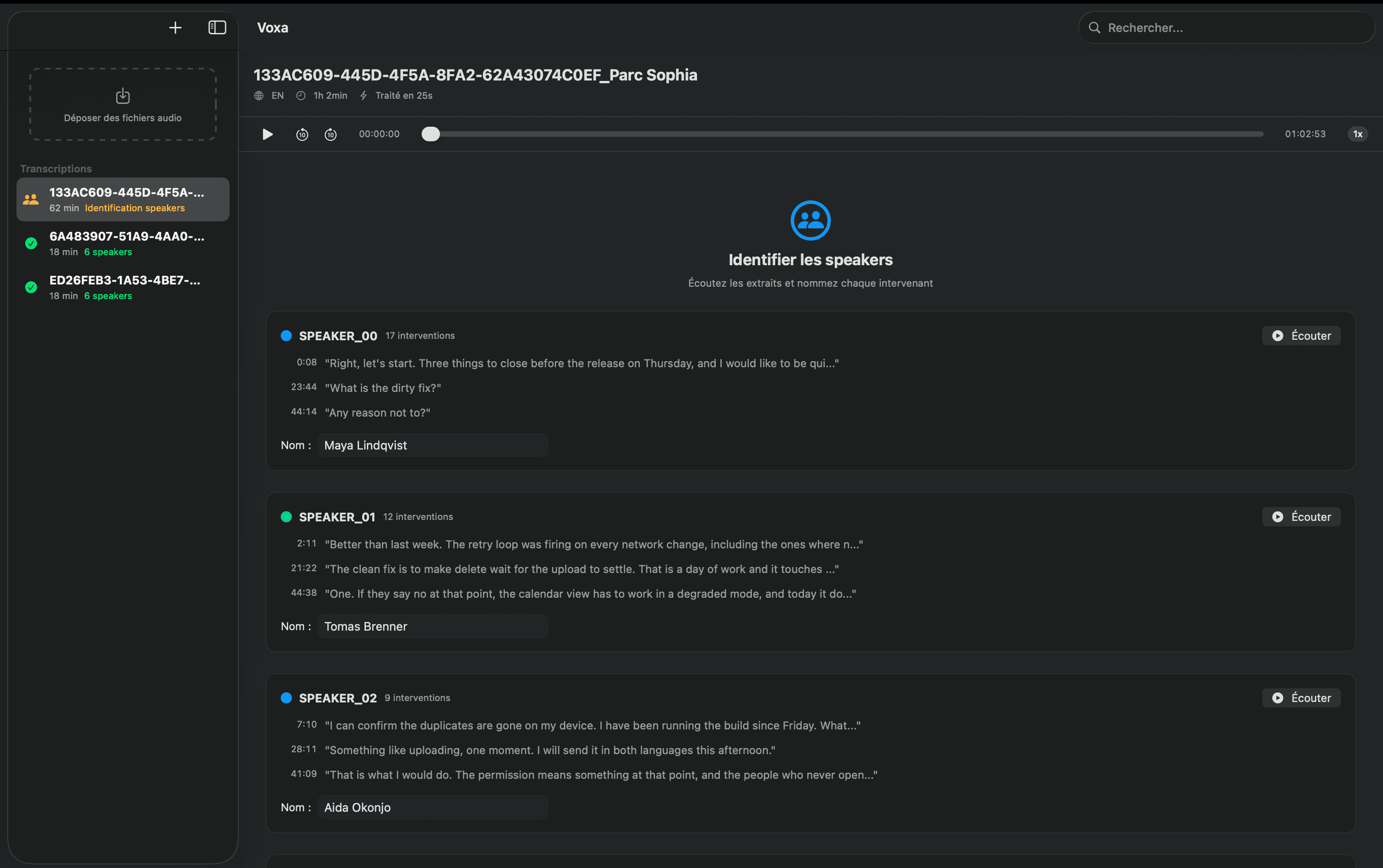
Speakers are named once. The next recording recognises the same voices and fills the names in before you start reading.
Video files are accepted too: only the audio track is kept. And since v1.3, Claude Code can drive the app through a local MCP server, to transcribe a file, read a transcript, name speakers or file a meeting report. The transcription still runs on the Mac; only the text Claude reads leaves it, and only if you connect it.
- Requires
- macOS 14.0+ on Apple Silicon (M1–M4)
- Transcription
- mlx-whisper, GPU-optimised
- Diarization
- pyannote.audio 4, community-1 model
- Summaries
- Ollama, running locally
A name learned once, a recording that survives a crash
Voices are matched on the Mac, and you keep the last word on names. When a step fails, what was already captured stays on disk.
- 1Record
- 2Two tracksOther branch: next launch: File complete?
- 3File complete?(stop)Other branch: kept: Two tracks
- 4Transcribe(verified)
- 5Known voice?(voices)Other branch: one voice: Named transcript
- 6Name speakers(unknown)
- 7Known voices(voice saved)
- Back to step 5, Known voice? (next meeting)
- Back to step 6, Name speakers (name pre-filled)
- 8Named transcript(confirmed)Other branch: Claude Code: Meeting report
- 9Ollama ready?(asked)Other branch: not ready: Named transcript
- 10Meeting report(ready)
5 scenariosPick one, the steps above follow itPick one, the diagram replays its path
A new colleague joins, then comes back the following weekNamed once
- Decided by
- You name the voice once. Code then matches it in the next meeting, and you confirm.
- Models saw
- Whisper and pyannote heard the audio. A local Ollama model read the transcript. Nothing left the Mac.
- You get
- The name already filled in, and a report once you ask for it.
Voxa crashes in the middle of a meetingRecording recovered
- Decided by
- Code: at the next launch it mixes the leftover tracks and checks the length. They are deleted only after the import.
- Models saw
- The audio captured before the crash, on this Mac.
- You get
- A transcript of what was captured, and a notice that a recording was recovered.
First run, and the HuggingFace terms were never acceptedStopped
- Decided by
- Code: the gated diarization models answer 403, so the run fails.
- Models saw
- Whisper ran. pyannote never loaded.
- You get
- The model pages to accept, then a re-import. No stack trace.
A voice memo with one speaker, and Ollama is not installedTranscript kept
- Decided by
- Code: one voice skips naming. With no Ollama binary, nothing can start.
- Models saw
- Whisper and pyannote only. No summary model ran.
- You get
- The full transcript, and a message that Ollama is not available.
Claude Code runs the report prompt on a .mov fileReport saved
- Decided by
- You: Claude proposes who is who and waits for your confirmation before naming anyone.
- Models saw
- Whisper and pyannote on the Mac. Claude reads the transcript text, never the audio.
- You get
- A Markdown report saved in Voxa, beside the transcript.
Paths traced in the v1.6.1 source: Python engine, .dmg build. Claude Code only sees text if you connect it.
Architecture
- Meeting audioSystem track and microphone
Voxa
- VoxaSwiftUI, menu bar
Inference subprocess, Ollama, Transcripts and voice prints
- Inference subprocessmlx-whisper, pyannote
- OllamaModel already on the Mac
- Transcripts and voice printsSwiftData, JSON
Inference subprocess
SwiftUI application
Native interface, menu bar integration, audio player with segment navigation, drag and drop for m4a, wav, mp3, and mp4 or mov video, from which only the audio track is kept.
ScreenCaptureKit capture
System audio and microphone captured together, which is what makes a remote meeting usable rather than half-recorded.
Python inference subprocess
mlx-whisper for transcription and pyannote community-1 for diarization, driven as a subprocess and kept off the UI thread.
Local summarisation
Ollama produces speaker summaries and meeting reports on the same machine. No API key exists to leak.
Built with
Client
- SwiftUI and SwiftData
- Window, menu bar item, and the store that holds transcripts and speaker names
- ScreenCaptureKit
- System audio capture, the half of a remote meeting a microphone cannot reach
- AVFoundation
- Microphone tap, the merge of the two recorded tracks, and segment playback
- Sparkle
- Updates from a signed appcast, so a fix reaches installs I will never see
Inference
- mlx-whisper
- Transcription on the Apple Silicon GPU, large-v3-turbo unless you pick otherwise
- pyannote.audio
- Speaker segmentation, and the voice centroids that let a name survive the meeting
- FFmpeg
- Audio decoding for mlx-whisper, needed for every format including wav
- Ollama
- Speaker summaries and meeting reports, from a model already installed locally
Tooling
- XcodeGen
- Project file generated from a short manifest instead of hand edited
- codesign and notarytool
- Developer ID signature, notarisation and stapling, inside the script that builds the dmg
- JSON Lines
- The entire Swift to Python contract: one object per line on stdout
- MCP over a loopback API
- A dependency-free stdio server for Claude Code, relaying to an HTTP API bound to 127.0.0.1 behind a bearer token, so the app stays the only writer of its store
Every stage runs on hardware I own
Under the hood
01A JSON Lines protocol between Swift and Python
Swift owns the interface, Python owns the models. They talk over JSON Lines on the subprocess pipe: one object per line, streamed. It means progress arrives continuously instead of at the end, and a crash on the Python side is a readable event rather than a hang.
02Shipping a Python runtime to people who do not have one
The hard part of an on-device ML app is not the inference, it is the first launch. The installer detects Python, creates a dedicated environment and installs the ML packages. Five to ten minutes, once. Everything after that is a normal Mac app.
03A speaker is named once, not once per meeting
Diarization returns anonymous labels: SPEAKER_00, SPEAKER_01. Renaming the same four colleagues after every meeting is the kind of chore that quietly ends the habit of using an app. When a name is confirmed, the voice centroid pyannote produced for that speaker is saved beside it, and the next transcription compares its own centroids against the saved ones. The threshold is a value I settled on from my own recordings, set high enough that no name is more likely than a wrong name.
candidates.sort(reverse=True)
matches = {}
used_names = set()

for sim, new_label, saved_name in candidates:
    if new_label not in matches and saved_name not in used_names:
        matches[new_label] = saved_name
        used_names.add(saved_name)
Greedy, best similarity first, so one voice cannot claim two names.
04On-device is a product decision, not a benchmark
Local inference is slower than a datacentre and that is fine. The recordings this app is built for are exactly the ones you would never upload, so the comparison that matters is against not transcribing them at all.
Gallery
Try it
Download it and run it.
A native macOS app cannot be embedded in a browser, so there is no demo to fake. There is a signed disk image, a first-run wizard that sets up the Python environment for you, and the source on GitHub if you would rather read it than install it.
The pyannote models require a free HuggingFace token on first run. FFmpeg is required and the wizard installs it. Ollama is optional, and only the summaries depend on it.
What broke
FFmpeg was shipped as optional, and never was
The setup wizard listed FFmpeg as a nice to have, on the assumption that it only mattered for exotic formats. mlx-whisper loads every file through it, wav included, so anyone who skipped that step finished the wizard with a working install that failed on their first file. It is now a blocking step, with a button that runs the Homebrew install. If the inference path shells out to a binary, that binary is a requirement, whatever the import list suggests.
A new app running an old Python script
The Python script lives outside the app bundle, copied out on first setup so it sits next to the virtual environment that runs it. The copy only ran during that first setup. Everyone who updated through Sparkle got the new interface driving the previous script, and the version number in the About window was correct, which made the reports impossible to read. Anything extracted from the bundle is now rewritten on every launch, and the stored path forced back to the managed one.
Two files and a merge, rather than one live mix
System audio and microphone are written to separate files during a recording, and merged only when it stops. Mixing them live in the audio engine is fewer moving parts and was the obvious first design, but it replays the system track on the machine that is capturing it, which is how you record a meeting with an echo of itself inside. The merge costs a few seconds, once, at the end.
Local inference still needs an account before it starts
The diarization weights are gated: a HuggingFace token, and the terms of two models accepted on their website, before anything downloads. An application whose entire point is that nothing leaves the machine cannot reach its first transcription without an online account. Nothing in the app can change that. What it does is recognise the 403 and show the two pages to accept, instead of handing over a stack trace.
An update mechanism that never had an address
Sparkle was in the app from v1.1, and Check for Updates never found anything. The feed URL and the public key were declared as build settings, and Xcode only copies the build settings it recognises into the Info.plist, so the built app shipped without either. Nothing failed loudly: an updater with no feed simply reports that you are up to date. They now live in a real Info.plist merged with the generated one, and v1.3.1 is the last version anyone has to install by hand.